循序渐进地在安卓native端实现了渐变色圆形液化二维码,本章是第三章(最后一章)。
本文主要在Android平台基于zxing实现了 “渐变色圆形液化” 效果二维码
1. 效果
1.1 期望效果
草料二维码平台生成的这种

1.2 最终效果
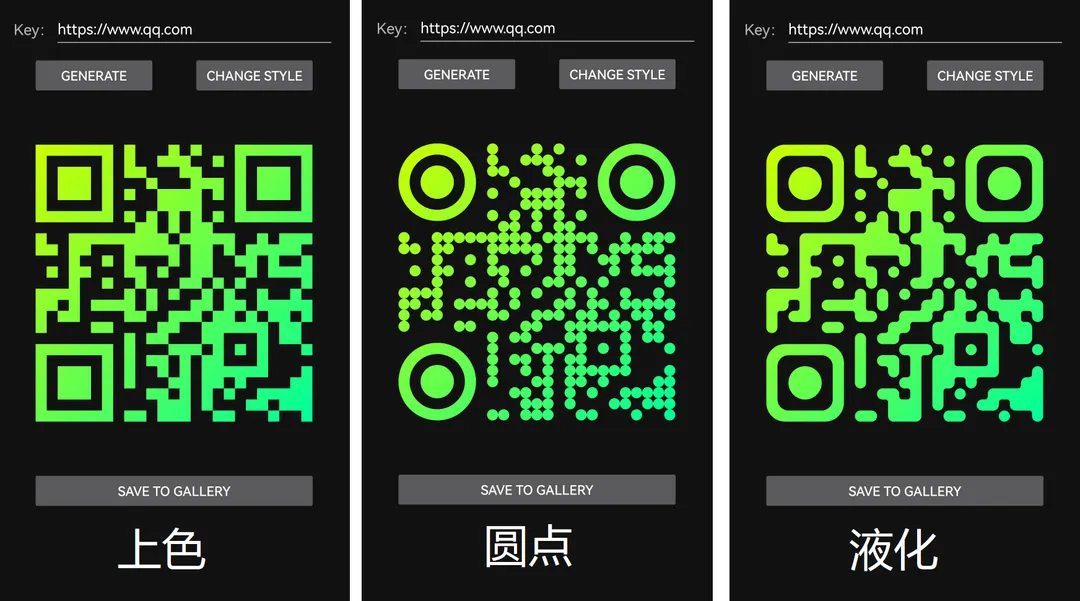
2. 背景
2.1 二维码
从二维码的组成开始看
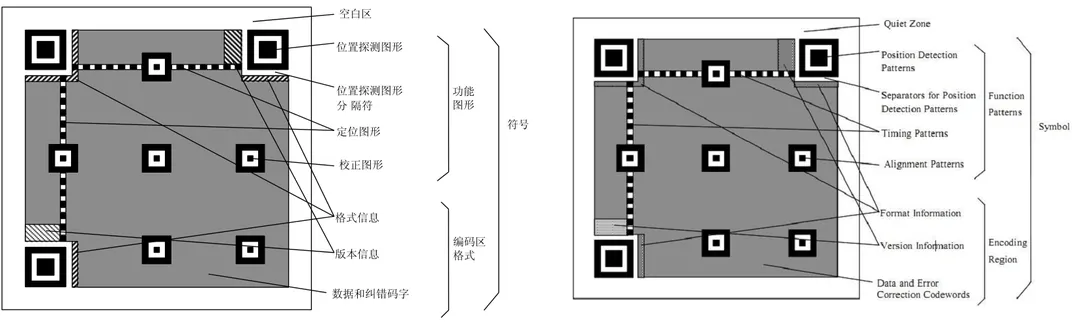
定位图案
- Position Detection Pattern 是定位图案,用于标记二维码的矩形大小。这三个定位图案有白边叫Separators for Postion Detection Patterns,用作分割。
- Timing Patterns 用于定位的。原因是二维码有40种尺寸,尺寸过大了后需要有根标准线,防止扫描歪了。
- Alignment Patterns 只有Version 2以上(包括Version2)的二维码需要,为了定位用的。
功能性数据
Format Information 存在于所有的尺寸中,用于存放一些格式化数据的。
Version Information 在 >= Version 7以上,需要预留两块3 x 6的区域存放一些版本信息。
数据码和纠错码
- 剩下的地方存放 Data Code 数据码 和 Error Correction Code 纠错码。
其中,二维码有不同的尺寸(又称作version),version范围1~40,尺寸大小为 size = (v-1)*4 + 21。需要注意的是,定位图案大小固定是 7*7。
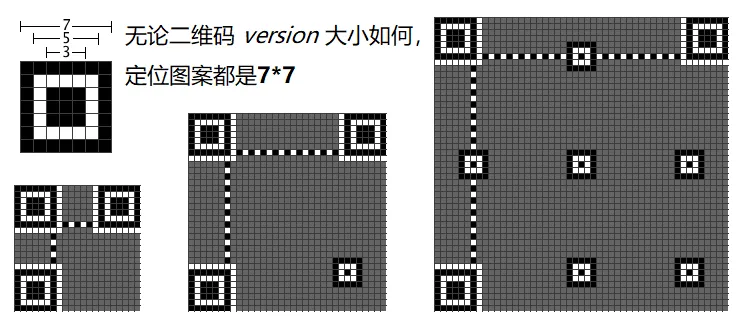
2.2 zxing 库
zxing是一个开源的,用Java实现的多种格式的1D/2D条码图像处理库,包含了联系到其他语言的端口。zxing可以实现使用手机的内置的摄像头完成条形码的扫描及解码。
具体使用方法这里不再赘述。
3. 实现
因为要异化图片显示,这里全部使用了自绘。
3.1 矩阵生成
自绘需要得知哪些点命中显示,哪些点命中不显示。这里使用 zxing 库提供的接口,生成二维矩阵。
X X X X X X X   X       X   X       X X X X X X X
X           X   X     X X X     X   X           X
X   X X X   X   X X       X X       X   X X X   X
X   X X X   X       X       X X X   X   X X X   X
X   X X X   X   X     X X X X   X   X   X X X   X
X           X         X X X X       X           X
X X X X X X X   X   X   X   X   X   X X X X X X X
                  X X   X   X X
X     X X X X X X X X X   X X X X X     X   X X X
X X   X X       X X X X X   X X   X   X X X X X
      X     X   X       X   X X     X X   X     X
  X   X X       X X   X     X X       X   X X X X
      X     X     X       X X   X   X           X
X X X X         X   X   X     X   X     X     X
X X   X   X X X X   X       X X   X X   X X X X X
X   X X         X X     X X X   X X   X   X X   X
X         X X         X X     X X X X X X   X X
                X   X X       X X       X   X X
X X X X X X X   X       X X X   X   X   X       X
X           X   X   X X   X   X X       X
X   X X X   X   X     X   X   X X X X X X       X
X   X X X   X   X       X X   X X   X         X X
X   X X X   X       X X   X   X   X     X X X X X
X           X         X X X   X       X X   X X X
X X X X X X X   X X   X X X     X X       X     X
代码实现
    private static BitMatrix createBitMatrix(String content, int size) throws WriterException {
        QRCodeWriter qrCodeWriter = new QRCodeWriter();
        //定义属性
        HashMap<EncodeHintType, Object> hintTypeStringMap = new HashMap<>();
        hintTypeStringMap.put(EncodeHintType.MARGIN, 0);
        hintTypeStringMap.put(EncodeHintType.CHARACTER_SET, "utf8");
        hintTypeStringMap.put(EncodeHintType.ERROR_CORRECTION, ErrorCorrectionLevel.M);//设置最高错误级别
        if (size > 0) {
            hintTypeStringMap.put(EncodeHintType.MAX_SIZE, size / 5); //设置最大值
            hintTypeStringMap.put(EncodeHintType.MIN_SIZE, size / 10); // 设置最小值
        }
        return qrCodeWriter.encode(content, BarcodeFormat.QR_CODE, size, size, hintTypeStringMap);
    }
3.2 上渐进色
如果只是上渐进色,不涉及自行用画布绘制的话,可以生成目标size大小的矩阵,在生成bitmap前根据startColor、endColor ,循环遍历每个点,根据偏移量直接计算得到各个点的色值即可。
    // 渐变色二维码
    @Nullable
    public static Bitmap generateColorfulBitmap(String content, int size, Color startColor, Color endColor) {
        try {
            BitMatrix bitMatrix = createBitMatrix(content, size);
            int[] arr = new int[size * size];
            for (int i = 0; i < size; i++) {
                for (int j = 0; j < size; j++) {
                    if (bitMatrix.get(i, j)) {
                        int r = (int) (255 * (startColor.red() - (startColor.red() - endColor.red()) / size * (j + 1)));
                        int g = (int) (255 * (startColor.green() - (startColor.green() - endColor.green()) / size * (j + 1)));
                        int b = (int) (255 * ((startColor.blue() - (startColor.blue() - endColor.blue()) / size * (j + 1))));
                        int colorInt = Color.argb(255, r, g, b);
                        arr[i * size + j] = colorInt;
                    } else {
                        arr[i * size + j] = Color.TRANSPARENT;
                    }
                }
            }
            return Bitmap.createBitmap(arr, size, size, Bitmap.Config.ARGB_8888);
        } catch (WriterException e) {
            e.printStackTrace();
        }
        return null;
    }
3.3 圆点风格
- 对于渐变色,对于画笔
Paint设置LinearGradient渐变色类型的Shader; - 对于内部各个点,找到中心坐标,然后直接绘圆;见
drawInnerLittleDot()。 - 对于周边三处定位点,依次绘制7*7(带颜色), 5*5(不带颜色), 3*3(带颜色)的圆;见
drawOneDetectPositionDotImpl()。
// 圆点二维码
@Nullable
public static Bitmap generateDotBitmap(String content, int size, Color startColor, Color endColor) {
try {
BitMatrix bitMatrix = createBitMatrix(content, 0);
Bitmap qrCodeBitmap = Bitmap.createBitmap(size, size, Bitmap.Config.ARGB_8888);
drawDotBitMapImpl(qrCodeBitmap, bitMatrix, size, startColor, endColor);
return qrCodeBitmap;
} catch (Exception e) {
e.printStackTrace();
}
return null;
}
private static void drawDotBitMapImpl(Bitmap qrCodeBitmap, BitMatrix bitMatrix, int size, Color startColor, Color endColor) {
Canvas canvas = new Canvas(qrCodeBitmap);
Paint paint = new Paint();
paint.setAntiAlias(true);
paint.setShader(new LinearGradient(0f, 0f, (float) size, (float) size, startColor.toArgb(), endColor.toArgb(), Shader.TileMode.CLAMP));
drawInnerLittleDot(canvas, paint, bitMatrix, size);
drawOuterDetectPositionBigDot(canvas, paint, bitMatrix, size);
canvas.drawBitmap(qrCodeBitmap, null, new Rect(0, 0, size, size), null);
}
// 绘制三个定位角以外的小圆点们
private static void drawInnerLittleDot(Canvas canvas, Paint paint, BitMatrix bitMatrix, int size) {
int matrixSize = bitMatrix.getWidth();
float dotSize = size / (float) matrixSize;
float dotRadius = dotSize / 2;
float curDotCenterX, curDotCenterY;
for (int row = 0; row < matrixSize; row++) {
for (int column = 0; column < matrixSize; column++) {
if (!bitMatrix.get(row, column)) {
continue;
}
if (row <= 6 && column <= 6 || row <= 6 && column >= matrixSize - 7 || row >= matrixSize - 7 && column <= 6) {
// 左上角、右上角、左下角,不绘制小圆点
continue;
}
curDotCenterX = row * dotSize + dotRadius;
curDotCenterY = column * dotSize + dotRadius;
canvas.drawCircle(curDotCenterX, curDotCenterY, dotRadius, paint);
}
}
}
// 绘制三个定位角
private static void drawOuterDetectPositionBigDot(Canvas canvas, Paint paint, BitMatrix bitMatrix, int size) {
float perDotSize = size / (float) bitMatrix.getWidth();
float totalRadius = perDotSize * 7 / 2;
drawOneDetectPositionDotImpl(canvas, paint, totalRadius, totalRadius, perDotSize);
drawOneDetectPositionDotImpl(canvas, paint, totalRadius, size - totalRadius, perDotSize);
drawOneDetectPositionDotImpl(canvas, paint, size - totalRadius, totalRadius, perDotSize);
}
// 绘制单个定位角。实现是依次绘制三个圆,且内部覆盖外部
private static void drawOneDetectPositionDotImpl(Canvas canvas, Paint paint, float dotCenterX, float dotCentY, float perDotSize) {
Xfermode paintXfermode = paint.getXfermode();
canvas.drawCircle(dotCenterX, dotCentY, perDotSize * 7 / 2, paint);
// 重合的地方混合方式,显示空白
paint.setXfermode(new PorterDuffXfermode(PorterDuff.Mode.CLEAR));
canvas.drawCircle(dotCenterX, dotCentY, perDotSize * 5 / 2, paint);
paint.setXfermode(paintXfermode);
canvas.drawCircle(dotCenterX, dotCentY, perDotSize * 3 / 2, paint);
}
3.4 圆点液化
分析液化方式如下,需要改动3.3圆点风格drawInnerLittleDot()、drawOuterDetectPositionBigDot的代码实现。
3.4.1 边角定位点
定位点大小7*7,不再是简圆环套圆,而改成了圆角正方形套圆。可以分成下图 3 个部分,依次绘制即可。
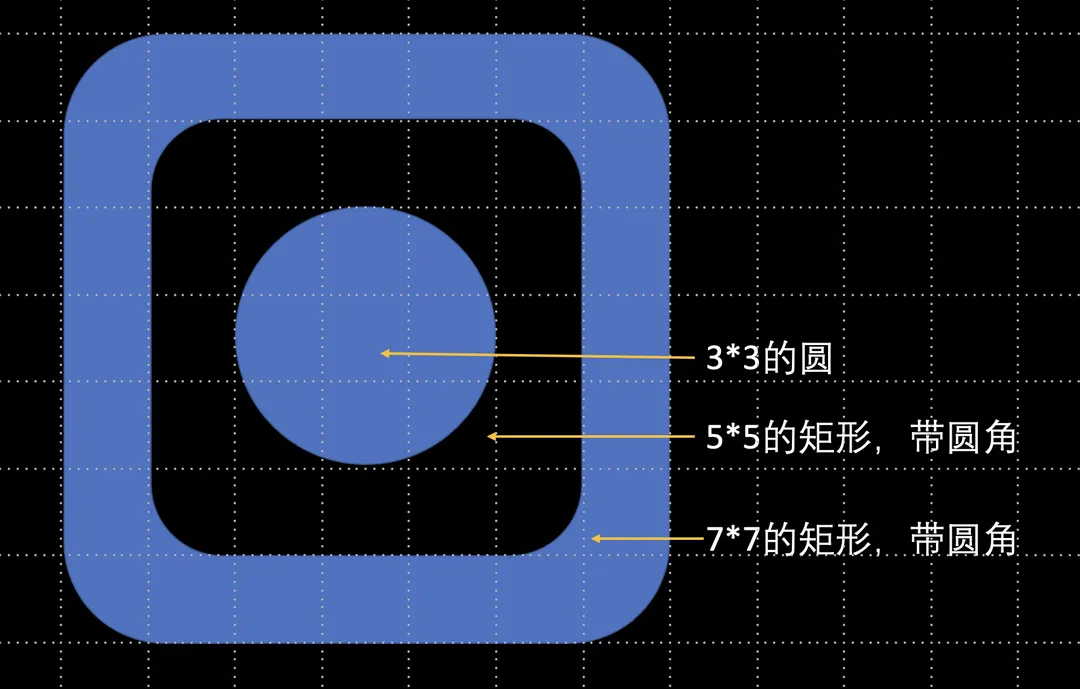
- 代码实现
    // 绘制三个定位角
    private static void drawOuterDetectPositionBigDot(Canvas canvas, Paint paint, BitMatrix bitMatrix, int size) {
        float perDotSize = size / (float) bitMatrix.getWidth();
        float totalRadius = perDotSize * 7 / 2;
        drawOneDetectPositionDotImpl(canvas, paint, totalRadius, totalRadius, perDotSize);
        drawOneDetectPositionDotImpl(canvas, paint, totalRadius, size - totalRadius, perDotSize);
        drawOneDetectPositionDotImpl(canvas, paint, size - totalRadius, totalRadius, perDotSize);
    }

    // 绘制单个定位角。实现是依次绘制三个圆,且内部覆盖外部
    private static void drawOneDetectPositionDotImpl(Canvas canvas, Paint paint, float dotCentX, float dotCentY, float perDotSize) {
        Xfermode paintXfermode = paint.getXfermode();
        float maxRadius = perDotSize * 7 / 2;
        canvas.drawRoundRect(dotCentX - maxRadius, dotCentY - maxRadius, dotCentX + maxRadius, dotCentY + maxRadius,
                (float)( perDotSize * 1.7), (float)( perDotSize * 1.7), paint);

        // 重合的地方混合方式,显示空白
        paint.setXfermode(new PorterDuffXfermode(PorterDuff.Mode.CLEAR));
        float midRadius = perDotSize * 5 / 2;
        canvas.drawRoundRect(dotCentX - midRadius, dotCentY - midRadius, dotCentX + midRadius, dotCentY + midRadius,
                perDotSize, perDotSize, paint);

        paint.setXfermode(paintXfermode);
        canvas.drawCircle(dotCentX, dotCentY, perDotSize * 3 / 2, paint);
    }
3.4.2 内部各个点
假设二维码每个点的大小为dotWidth:
- 孤立的点仍是直径为
dotWidth的圆。 - 端点、外拐角弧是直径为
dotWidth的圆 与 1-4个长dotWidth、宽dotWidth/2的矩形 的全部。 - 内拐角孤,是边长
dotWidth/4的正方形,剔除掉直径dotWidth/2的圆重合的部分。
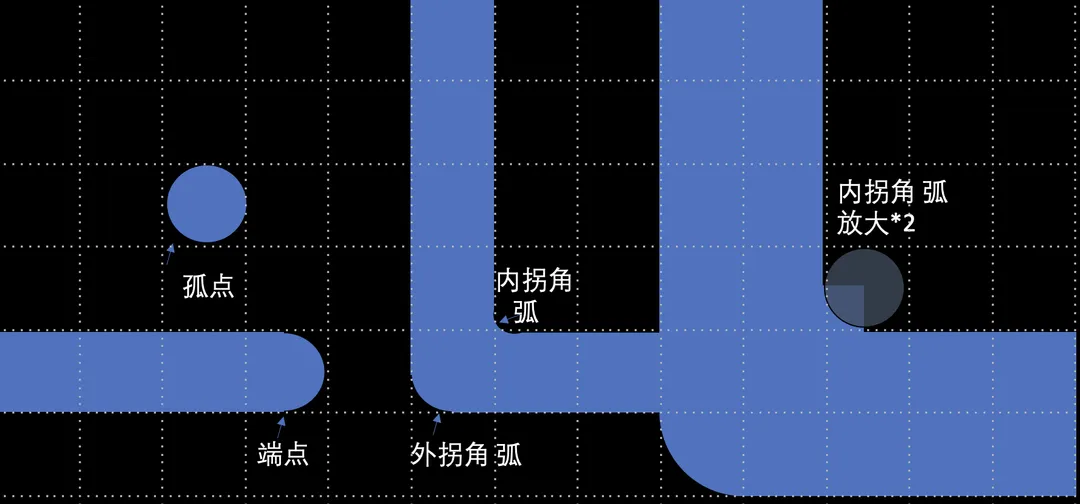
- 代码实现
// 绘制三个定位角以外的小圆点们
private static void drawInnerLittleDot(Canvas canvas, Paint paint, BitMatrix bitMatrix, int size) {
int matrixSize = bitMatrix.getWidth();
float dotSize = size / (float) matrixSize;
float dotRadius = dotSize / 2;
float curDotCenterX, curDotCenterY;
for (int column = 0; column < matrixSize; column++) {
for (int row = 0; row < matrixSize; row++) {
if (column <= 6 && row <= 6 || column <= 6 && row >= matrixSize - 7
|| column >= matrixSize - 7 && row <= 6) {
// 左上角、右上角、左下角,不绘制小圆点
continue;
}
curDotCenterX = column * dotSize + dotRadius;
curDotCenterY = row * dotSize + dotRadius;
if (bitMatrix.get(column, row)) {
boolean needDrawCircle = drawRectWhenNeeded(canvas, paint, bitMatrix, curDotCenterX, curDotCenterY, dotRadius, column, row);
if (needDrawCircle) { // 如果矩形已经画满这个点,就没必要再画圆了。
canvas.drawCircle(curDotCenterX, curDotCenterY, dotRadius, paint);
}
} else {
drawRoundEdgeWhenNeeded(canvas, paint, bitMatrix, curDotCenterX, curDotCenterY, dotRadius, column, row);
}
}
}
}
/**
* 绘制矩形
*
* @return 是否还要绘制圆形
*/
private static boolean drawRectWhenNeeded(Canvas canvas, Paint paint, BitMatrix bitMatrix, float centX, float centY,
float dotRadius, int column, int row) {
int matrixSize = bitMatrix.getWidth();
boolean isLeftEmpty = column == 0 || !bitMatrix.get(column - 1, row);
boolean isRightEmpty = column == matrixSize - 1 || !bitMatrix.get(column + 1, row);
boolean isTopEmpty = row == 0 || !bitMatrix.get(column, row - 1);
boolean isBottomEmpty = row == matrixSize - 1 || !bitMatrix.get(column, row + 1);
if (!isLeftEmpty && !isRightEmpty || !isTopEmpty && !isBottomEmpty) {
canvas.drawRect(centX - dotRadius, centY - dotRadius, centX + dotRadius, centY + dotRadius, paint);
return false;
}
if (!isLeftEmpty) {
canvas.drawRect(centX - dotRadius, centY - dotRadius, centX, centY + dotRadius, paint);
}
if (!isRightEmpty) {
canvas.drawRect(centX + dotRadius, centY - dotRadius, centX, centY + dotRadius, paint);
}
if (!isTopEmpty) {
canvas.drawRect(centX - dotRadius, centY - dotRadius, centX + dotRadius, centY, paint);
}
if (!isBottomEmpty) {
canvas.drawRect(centX - dotRadius, centY + dotRadius, centX + dotRadius, centY, paint);
}
return true;
}
// 需要时,绘制矩形与圆重合,矩形有、圆没有的部分。适用于"L"这种拐角内部,拐角内部画个弧度
private static void drawRoundEdgeWhenNeeded(Canvas canvas, Paint paint, BitMatrix bitMatrix, float centX, float centY,
float dotRadius, int column, int row) {
int matrixSize = bitMatrix.getWidth();
float halfDotRadius = dotRadius / 2;
boolean isLeftEmpty = column == 0 || !bitMatrix.get(column - 1, row);
boolean isTopEmpty = row == 0 || !bitMatrix.get(column, row - 1);
boolean isRightEmpty = column == matrixSize - 1 || !bitMatrix.get(column + 1, row);
boolean isBottomEmpty = row == matrixSize - 1 || !bitMatrix.get(column, row + 1);
boolean isLeftTopEmpty = row == 0 || column == 0 || !bitMatrix.get(column - 1, row - 1);
boolean isLeftBottomEmpty = row == matrixSize - 1 || column == 0 || !bitMatrix.get(column - 1, row + 1);
boolean isRightTopEmpty = row == 0 || column == matrixSize - 1 || !bitMatrix.get(column + 1, row - 1);
boolean isRightBottomEmpty = row == matrixSize - 1 || column == matrixSize - 1 || !bitMatrix.get(column + 1, row + 1);
if (!isLeftTopEmpty && !isLeftEmpty && !isTopEmpty) {
RectF rectF = new RectF(centX - dotRadius, centY - dotRadius, centX - halfDotRadius, centY - halfDotRadius);
drawRectWithCircleClear(canvas, paint, rectF, centX - halfDotRadius, centY - halfDotRadius, halfDotRadius);
}
if (!isLeftBottomEmpty && !isLeftEmpty && !isBottomEmpty) {
RectF rectF = new RectF(centX - dotRadius, centY + halfDotRadius, centX - halfDotRadius, centY + dotRadius);
drawRectWithCircleClear(canvas, paint, rectF, centX - halfDotRadius, centY + halfDotRadius, halfDotRadius);
}
if (!isRightTopEmpty && !isRightEmpty && !isTopEmpty) {
RectF rectF = new RectF(centX + halfDotRadius, centY - dotRadius, centX + dotRadius, centY - halfDotRadius);
drawRectWithCircleClear(canvas, paint, rectF, centX + halfDotRadius, centY - halfDotRadius, halfDotRadius);
}
if (!isRightBottomEmpty && !isRightEmpty && !isBottomEmpty) {
RectF rectF = new RectF(centX + halfDotRadius, centY + halfDotRadius, centX + dotRadius, centY + dotRadius);
drawRectWithCircleClear(canvas, paint, rectF, centX + halfDotRadius, centY + halfDotRadius, halfDotRadius);
}
}
// 绘制矩形与圆重合,矩形有、圆没有的部分。适用于"L"这种拐角内部,拐角内部画个弧度
private static void drawRectWithCircleClear(Canvas canvas, Paint paint, RectF rectF, float centX, float centY, float radius) {
canvas.drawRect(rectF, paint);
Xfermode paintXfermode = paint.getXfermode();
paint.setXfermode(new PorterDuffXfermode(PorterDuff.Mode.CLEAR));
canvas.drawCircle(centX, centY, radius, paint);
paint.setXfermode(paintXfermode);
}
本章完结